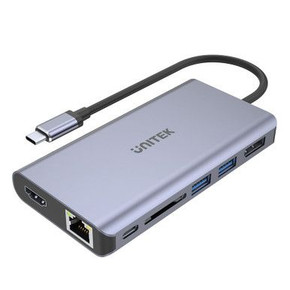
UNITEK 13-in-1 Multi-Port Triple 4K KVM Docking Station with USB-C Connector
The UNITEK 13-in-1 Multi-Port Triple 4K KVM Docking Station is the ultimate productivity solution for professionals who need seamless multi-computer and multi-display management. This versatile docking station not only expands your connectivity options but also allows you to switch between two computers effortlessly while sharing a single set of peripherals. Featuring 13 ports, including USB-C, USB-A, HDMI, DisplayPort, and an SD card slot, this docking station is designed for maximum flexibility and performance.
With support for triple 4K displays, high-speed data transfer, and diverse connectivity options, the UNITEK KVM Docking Station is perfect for workstations, creators, and multitaskers who demand efficiency and convenience.
Key Features
1. 13-in-1 Multi-Port Design
- Offers a wide range of connectivity options to streamline your workflow:
- 1x USB-C (10Gbps)
- 2x USB-A (10Gbps)
- 1x USB-A (5Gbps)
- 2x HDMI Ports
- 1x DisplayPort 1.4
- SD Card Slot
2. KVM Switch Functionality
- Switch between two computers while sharing the same peripherals (monitor, keyboard, mouse, etc.).
- Ideal for users who work with multiple devices, such as laptops and desktops.
3. Triple 4K Display Support
- Supports up to three 4K displays for immersive multitasking and enhanced productivity:
- Dual 4K via HDMI ports
- Single 4K via DisplayPort 1.4
4. High-Speed Data Transfer
- USB-C and USB-A ports deliver 10Gbps transfer speeds, enabling fast file transfers, seamless backups, and smooth data-sharing.
- Additional USB-A (5Gbps) port for connecting peripherals like keyboards, mice, or printers.
5. SD Card Slot
- Built-in SD card slot for convenient data transfer from memory cards, perfect for photographers and content creators.
6. Sleek and Compact Design
- The streamlined design saves desk space and ensures a clean, organized workspace.
- Durable and stylish, making it a perfect companion for home or office setups.
Specifications
- Switching Function: KVM (Keyboard, Video, Mouse) Switch for 2 computers
- USB Ports:
- 1x USB-C (10Gbps)
- 2x USB-A (10Gbps)
- 1x USB-A (5Gbps)
- Display Ports:
- 2x HDMI
- 1x DisplayPort 1.4
- SD Card Slot: Yes
- Display Support:
- Triple 4K (HDMI + HDMI + DP)
- Connector Type: USB-C
- Applications: Multi-computer setups, triple display configurations, data transfer, and peripheral sharing.
Applications
The UNITEK 13-in-1 Docking Station is ideal for:
- Professional Workstations: Manage multiple devices and displays for enhanced productivity.
- Content Creators and Designers: Seamlessly transfer files via SD card slot and connect multiple 4K displays for creative workflows.
- Home Office Setups: Share peripherals between two computers, minimizing hardware duplication and maximizing efficiency.
- IT Professionals: Easily switch between devices for troubleshooting and testing.
- Gaming Setups: Utilize multiple displays and high-speed USB ports for an optimized gaming experience.
Why Choose the UNITEK 13-in-1 KVM Docking Station?
- Multi-Computer Management: Switch between two computers with ease using the built-in KVM switch.
- Triple 4K Display Support: Connect up to three 4K monitors for immersive multitasking and productivity.
- Comprehensive Connectivity: 13 ports provide all the connections you need for peripherals, displays, and data transfer.
- High-Speed Transfer: USB-C and USB-A ports support 10Gbps speeds for quick and efficient data handling.
- Space-Saving Design: Compact form factor keeps your workspace organized and clutter-free.
- Trusted Brand: UNITEK is a reliable name in high-performance docking and connectivity solutions.
Frequently Asked Questions (FAQs)
1. What is a KVM Docking Station?
A KVM (Keyboard, Video, Mouse) Docking Station allows you to switch between multiple computers while sharing a single set of peripherals (e.g., monitor, keyboard, mouse) and other devices.
2. How many computers can I connect to this docking station?
The UNITEK 13-in-1 Docking Station allows you to connect two computers and switch between them seamlessly.
3. What kind of displays can I connect?
You can connect up to three 4K displays using the following ports:
- 2x HDMI ports
- 1x DisplayPort 1.4
4. Can I use this docking station with a single computer?
Yes, you can use this docking station with a single computer for expanded connectivity and multi-display support.
5. What devices are compatible with the USB ports?
The USB-C and USB-A ports are compatible with a variety of devices, including:
- External hard drives
- Flash drives
- Keyboards and mice
- Printers
- Smartphones and tablets
6. What is the transfer speed of the USB ports?
- USB-C (10Gbps): High-speed data transfer for large files.
- USB-A (10Gbps): Ideal for fast data-sharing and backups.
- USB-A (5Gbps): For connecting peripherals like keyboards and mice.
7. Does this docking station support Power Delivery (PD)?
For detailed information on power delivery (PD) capabilities, please refer to the product manual or specifications.
8. Is the SD card slot compatible with all memory cards?
The SD card slot supports standard SD cards commonly used in cameras, drones, and other devices. For specific compatibility, check your card type and size.
9. Can I connect this docking station to a desktop and a laptop?
Yes, the docking station is designed to connect and switch between two computers, whether they are desktops, laptops, or a combination of both.
10. Is this docking station plug-and-play?
Yes, the UNITEK Docking Station is plug-and-play, meaning it requires no additional drivers or software for most operating systems.